Duminy Designs

Software and Engineering
for CNC Turning and Milling

Six tools for CNC programmers and machine shop managers, plus CAD and CAM engineering on your own parts.

Ø20 Ø30 Ø40 80 C2
O01128 (EXAMPLE SHAFT)
G21 G18 G40 G80 G99
G50 S2000
(T1 OD ROUGH)
T101
G96 S200 M03
G00 X52. Z2. M08
G71 U2. R0.5
G71 P10 Q20 U0.4 W0.1 F0.25
N10 G00 X16.
G01 Z0.
X20. Z-2.
Z-30.
X30.
Z-55.
X40. Z-60.
Z-80.
N20 X52.
G70 P10 Q20 F0.1
G28 U0. W0.
M30
Part
Example shaft
Material
EN8
Stock
Ø50 bar
Program
O01128
Machine
Gang‑tool lathe

An example stepped shaft, its finish pass and a lathe program for it.

HAAS and Fanuc-style G‑code Siemens Sinumerik 828D, including CYCLE93, CYCLE95 and CYCLE97 CAD/CAM toolpaths and post-processing

Products

All six run in the browser. Each user gets their own login, and you decide who can open which tool.

Lathe Program Builder

Write a complete lathe program by filling in operations instead of typing G‑code.

For setters and programmers on HAAS gang‑tool lathes.

Request access
Operations
Facing, OD and ID profiles, grooving, threading, drilling and parting off, set up from stock size, clearance and spindle limit.
Output
G71, G75, G76, G83 and G94 canned cycles, or every move written out. Block numbering to suit your shop.
Checks
Stops undercuts that G71 can't cut, chamfers and radii that don't fit their leg, and spindle speeds above the machine's maximum.
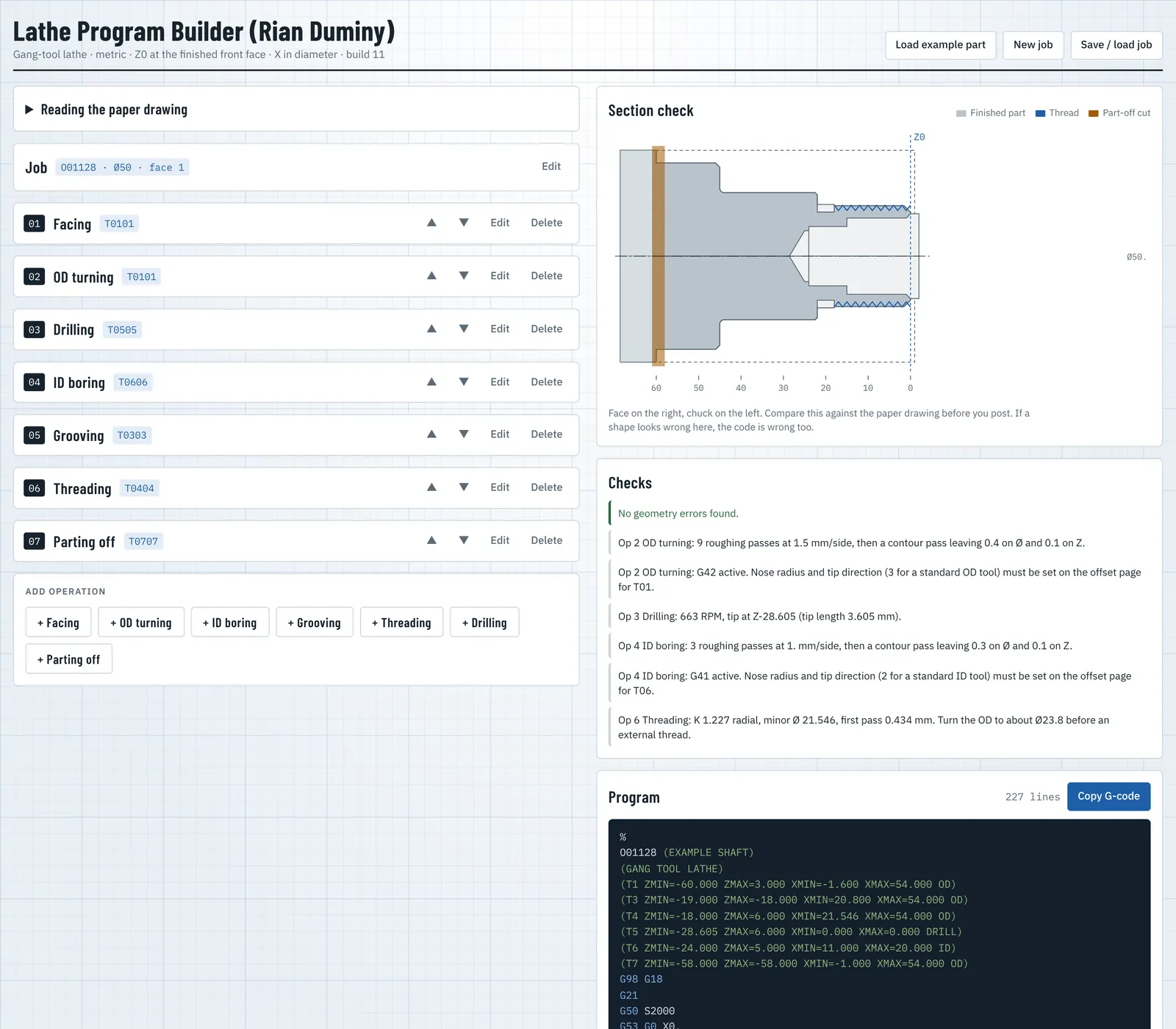
Lathe Program Builder with seven operations for an example shaft, its section view and the generated G-code program
The built-in example part: seven operations on the left, the section check and the generated program on the right.

CNC Simulator

Preview a program before it runs on the machine.

For programmers proving code from CAM or written by hand, on lathes and mills.

Request access
Reads
HAAS and Fanuc-style code, and Sinumerik 828D programs with their turning cycles.
Shows
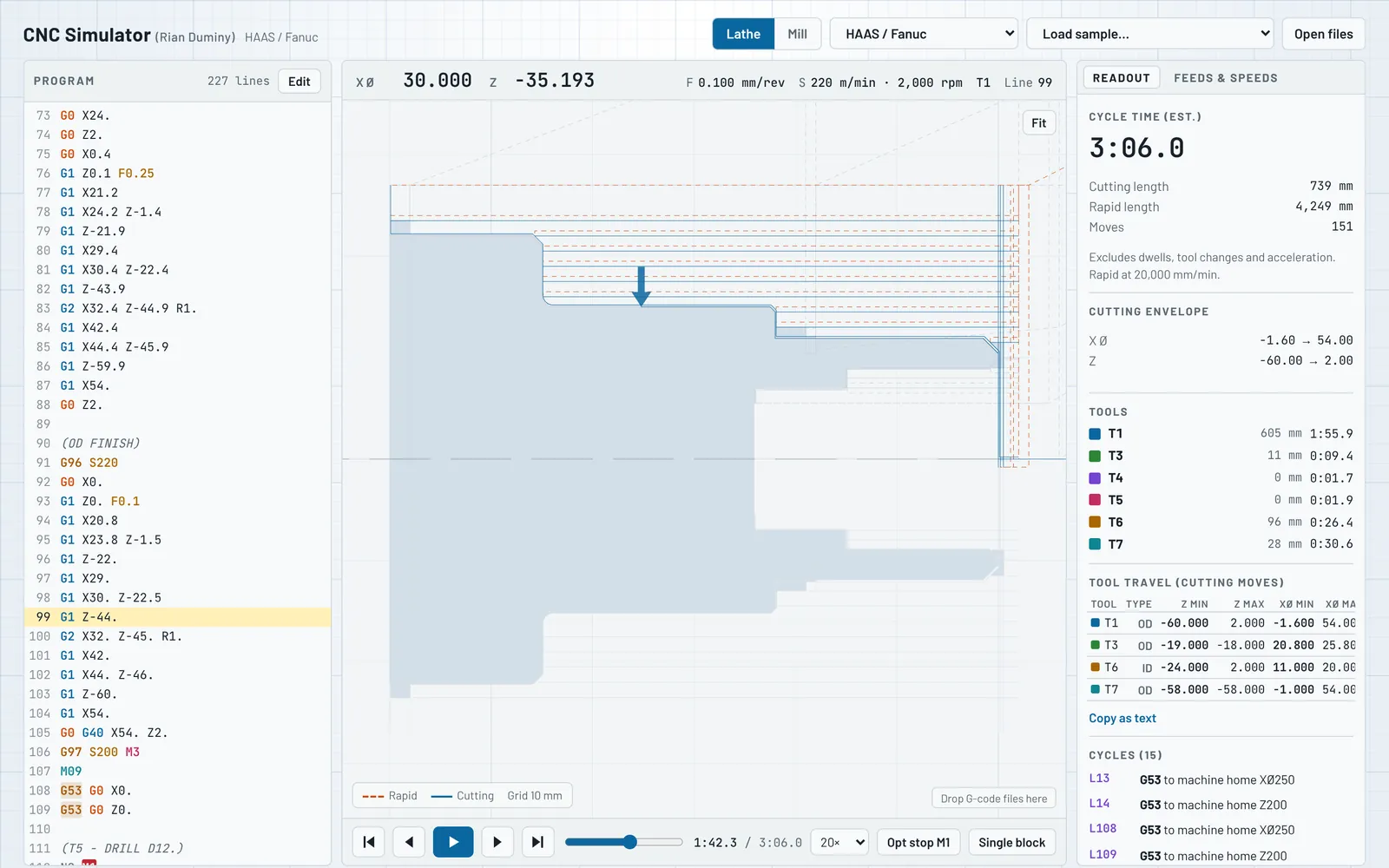
The toolpath in 3D with feeds and rapids separated, a live position readout, and the finished part as a solid.
Warns
Cycles called before a start position is known, grooving steps wider than the tool, and moves with no depth to cut.
Calculates
Cutting speeds and feeds for common shop materials, from free-cutting brass to titanium, in HSS or carbide.
CNC Simulator showing a lathe program, the toolpath over the finished part and a live position readout
The same program in the simulator, part-way through the OD finish pass, with the position, feed and spindle readout above the view.

Feeds & Speeds Calculator

Spindle speed and feed rate for the cut in front of you, with the G‑code lines to paste into the program.

For setters and programmers on lathes and mills, running HAAS, Fanuc-style or Sinumerik controls.

Operations
Turning, milling, drilling and tapping, in HSS or carbide, roughing or finishing.
Materials
Fifteen common shop materials, from plastics and aluminium to stainless, tool steel and titanium, with the starting range for each.
Results
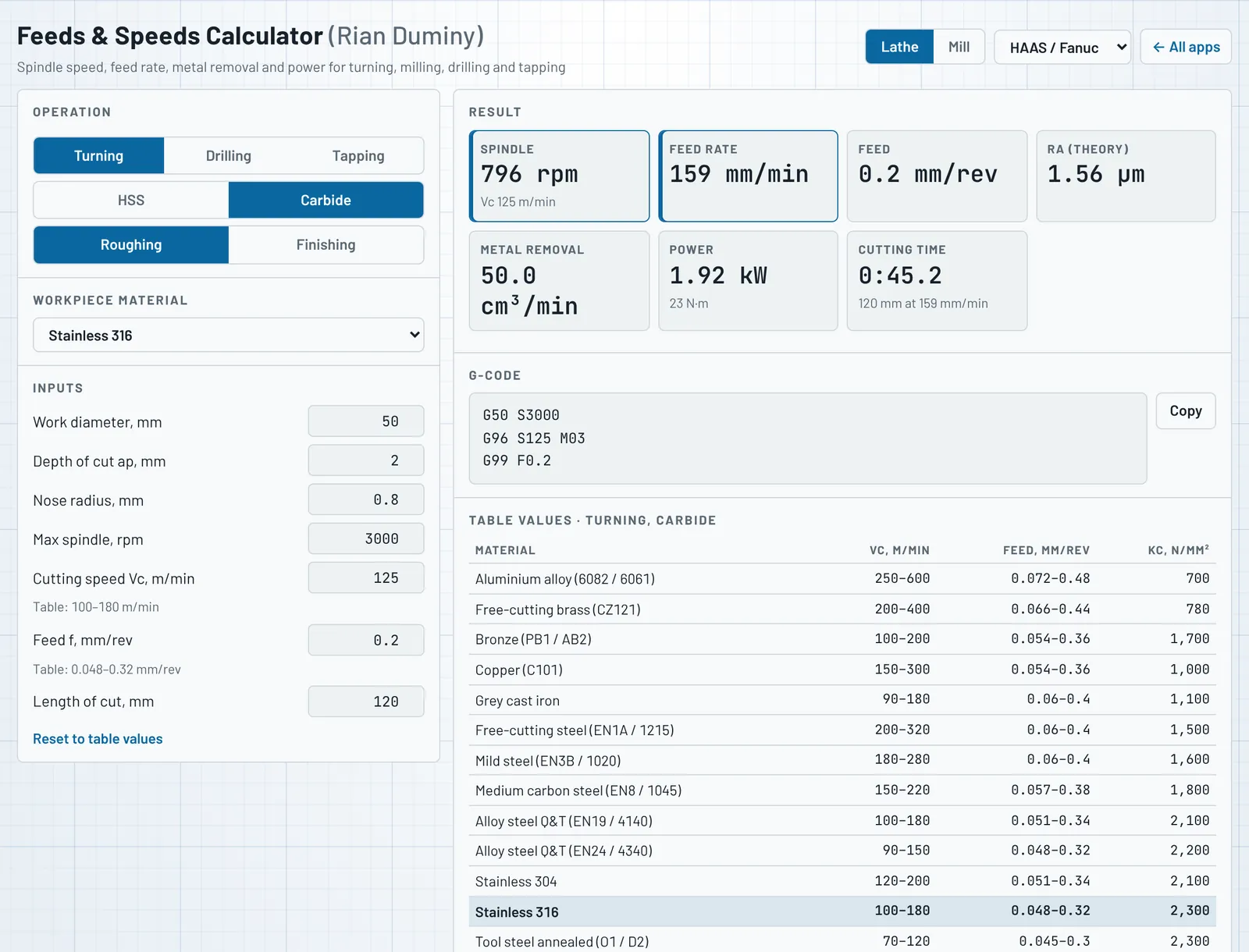
Spindle rpm held to your machine's limit, feed rate, metal removal rate, power and torque, theoretical surface finish and cutting time.
Milling
Feed per tooth raised for chip thinning when the width of cut is under half the cutter diameter.
Output
Speed and feed blocks for HAAS/Fanuc or Sinumerik 828D: G96 with G50 or LIMS, G97, and feed per rev or per minute.
Feeds and Speeds Calculator showing spindle speed, feed rate, power and G-code for roughing stainless 316
Roughing stainless 316 on a Ø50 bar with carbide: spindle speed, feed rate, power and the G-code lines to paste in.

Spindle Project Management

Jobs, machine time and tooling for a machine shop, in one place.

For shop owners and production managers who need to know where every job stands.

Request access
Jobs
Drop in a drawing PDF and the job is created, with material and stock length read from the drawing.
Time
Start, pause and stop timers per operator and per machine, with a full history on every job.
Tooling
Insert library with codes, grades, suppliers, bin locations, stock levels and photos, shared with Tooling Stock Control.
Inspection
Measuring report PDFs built from the drawing's dimensions, one sheet per unit.
Users
Several people can log in and work on the same jobs.
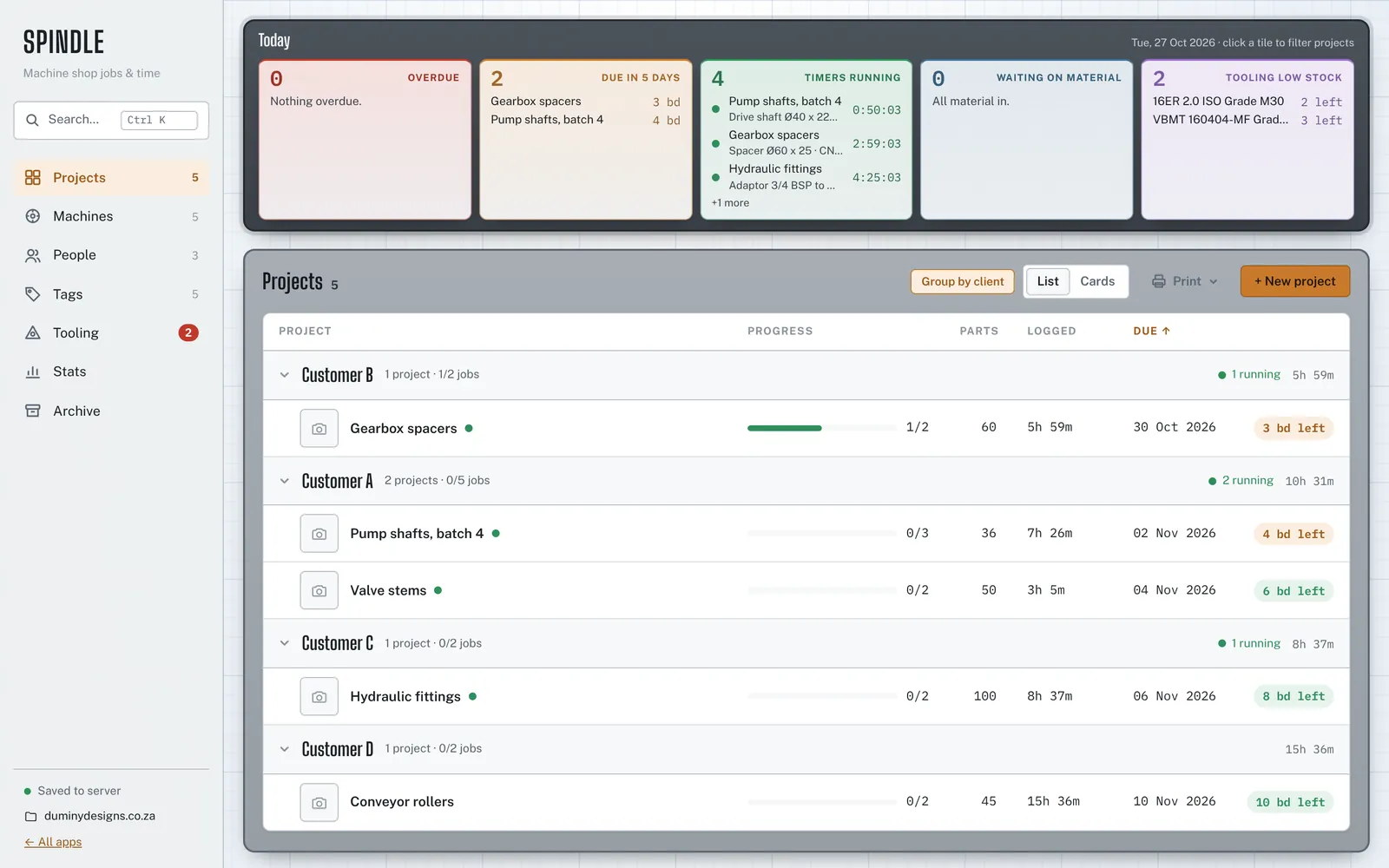
Spindle dashboard with due jobs, running timers, low tooling stock and the project list grouped by customer
The Today board and project list. Shown with demo data; the customers, parts and operators are placeholders.

Tooling Stock Control

Insert and cutter stock that warns you before the bin runs empty.

For tool crib and production managers who order inserts and need to know where they go.

Stock
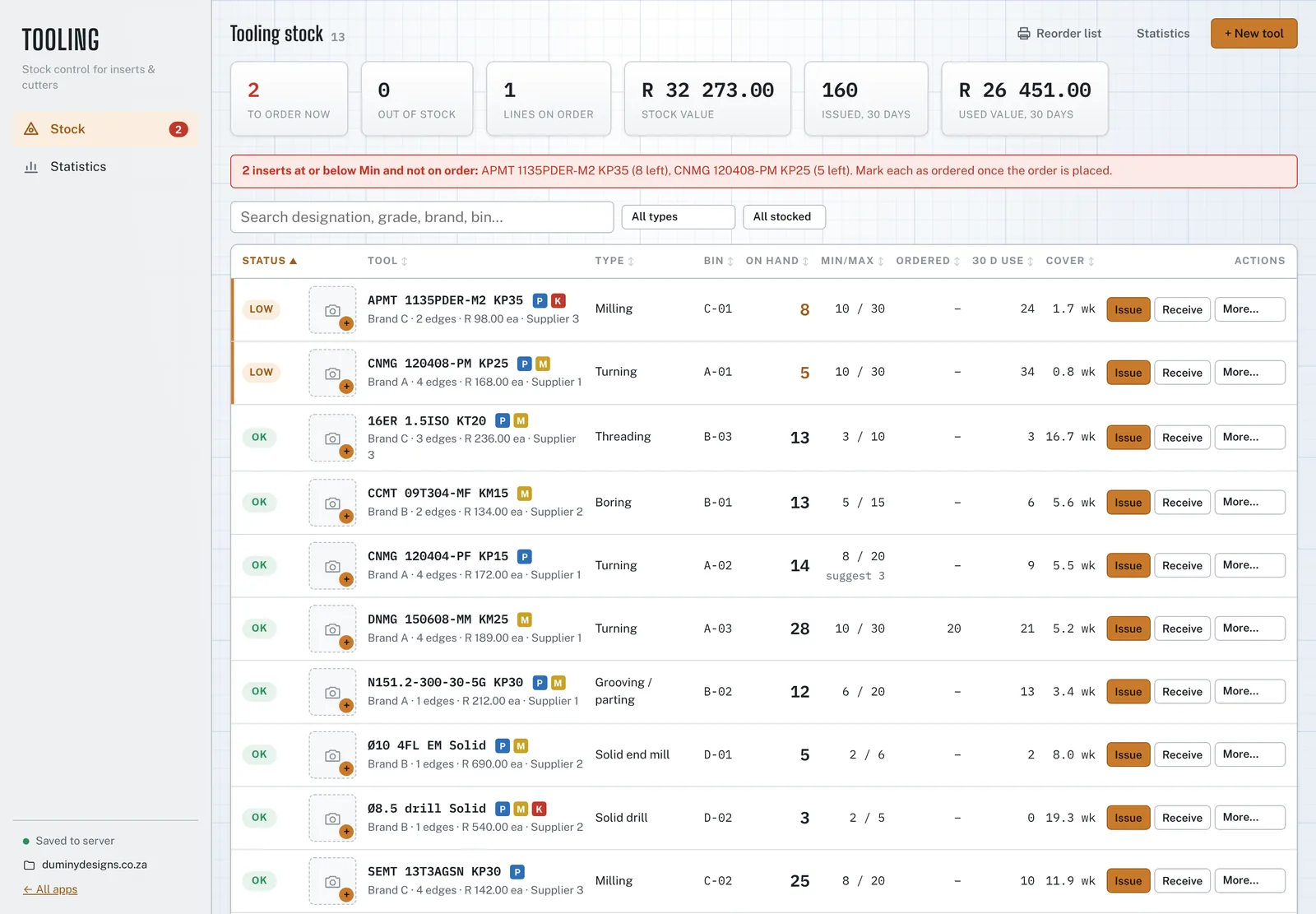
One line per insert or cutter, with grade, bin, pack size, price, supplier and lead time. On hand is the sum of every issue, receipt, return, write-off and count.
Warnings
Lines at or below Min flagged as low, at zero as out, with open orders taken into account.
Ordering
Order quantities that refill to Max in whole packs, and a reorder list PDF grouped by supplier.
Use
Consumption by machine, person, job and reason, breakage share, dead stock and a management report.
Free tool
A reorder point calculator on the tooling page: suggested Min and order quantity for one line.
Tooling Stock Control stock list with low lines on top, bins, on hand, Min and Max, orders and weeks of cover
The stock list, worst first. Shown with demo data; brands, suppliers and people are placeholders.

Setup Sheet Generator

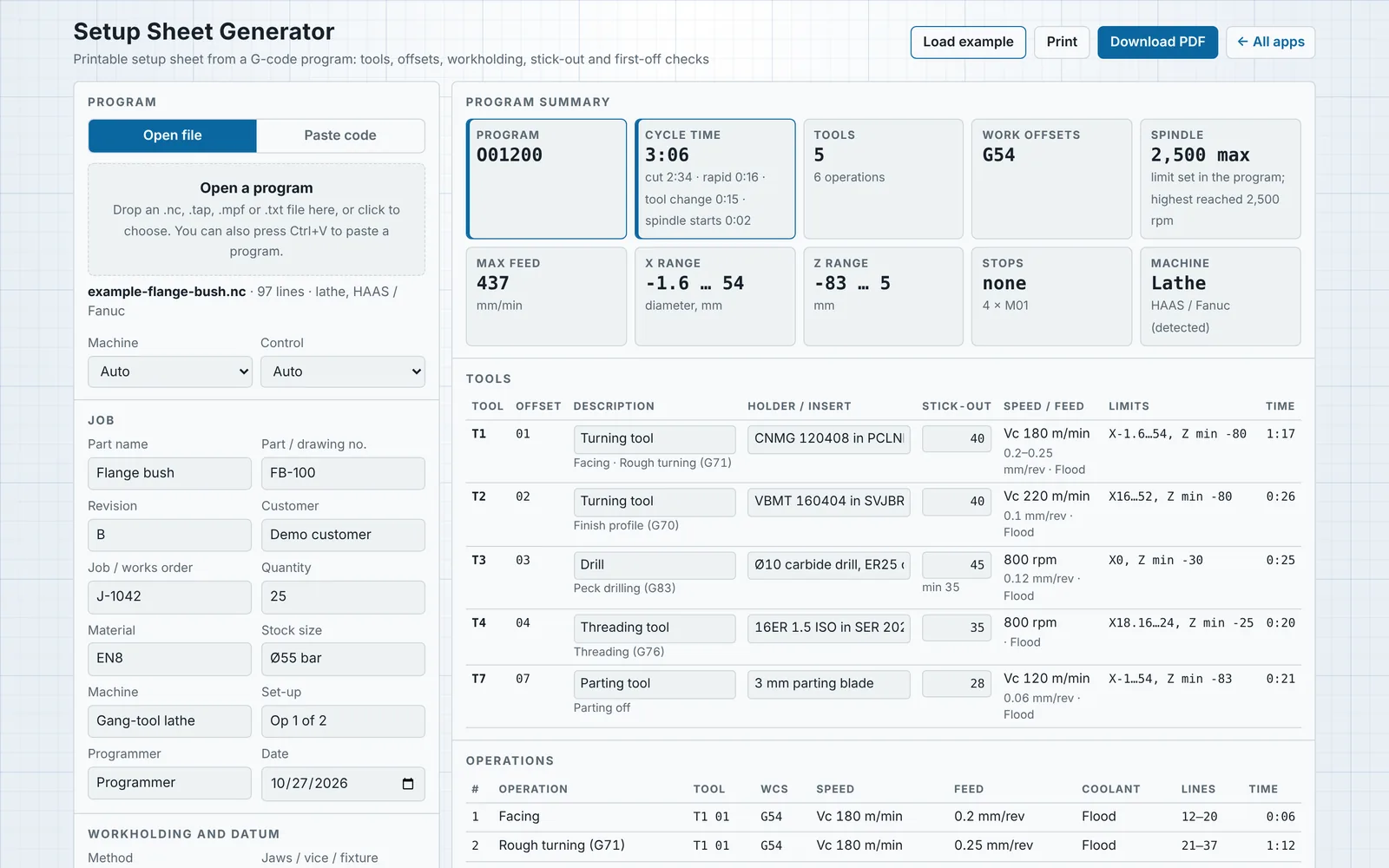
A printable setup sheet for the machine, read from the program itself.

For programmers handing a job to the setter, on lathes and mills running HAAS, Fanuc-style or Sinumerik controls.

Reads
The tool list, offsets, work offsets, spindle speeds, feeds, coolant, travel limits and program stops, straight from the G‑code.
You add
Workholding, jaws and grip length, part and tool stick-out, holders and inserts, set-up photos and notes for the setter.
Stick-out
The minimum part stick-out from the jaws and the minimum tool stick-out, from the deepest Z each tool reaches.
First-off
Checks suggested from the program: finished diameters, shoulder lengths, hole depths and threads, with blank columns to record up to five parts.
Output
An A4 PDF to download or print: title block, summary with an estimated cycle time, tools, operation sequence, checks and sign-off boxes.
Setup Sheet Generator with a lathe program read into a tool list, operation sequence and first-off checks
The built-in example: a flange bush on a gang-tool lathe, read into tools, operations and first-off checks, ready to download as a PDF.

Engineering services

The work the products grew out of, done on your parts.

CAD models and drawings

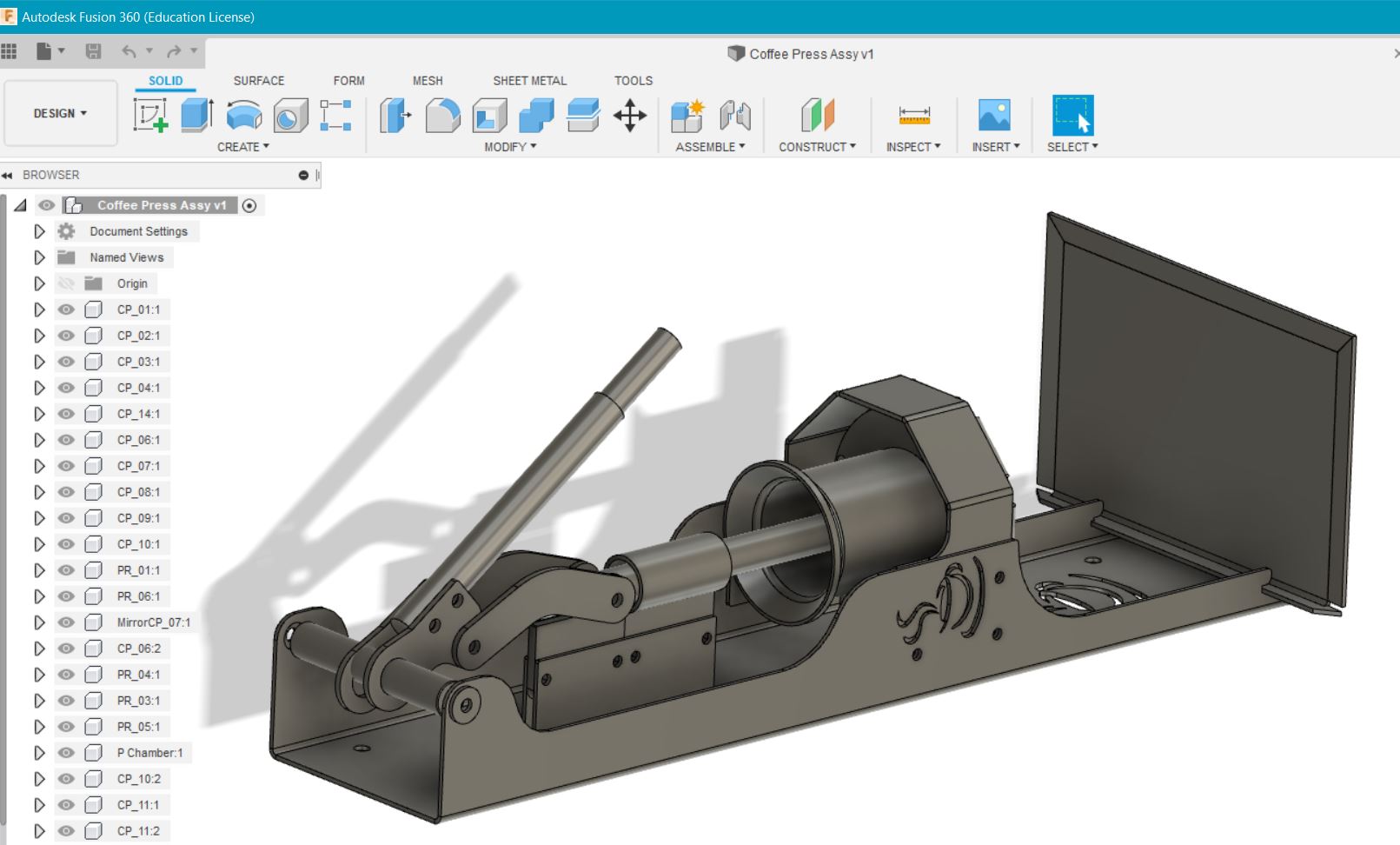
3D parts and assemblies. Dimensioned, toleranced 2D drawings from a sketch, a sample part or an existing model.

CAM and CNC programming

CAM toolpaths, post-processed and checked by hand for HAAS and Sinumerik controls. Program edits and first-off support.

Shop implementation

The route from CAD to the machine: post-processors, tool libraries, setup sheets and program standards your setters can follow.

Cutting data

Starting speeds and feeds worked out for your machines, tooling and materials, written into your tool library and setup sheets.

Electronics and sensors

Microcontroller programming and sensor-based control for products and machine add-ons.

Recent work

Models, drawings and toolpaths.

Rian Duminy

Duminy Designs is run by Rian Duminy, a CAD, CAM and CNC engineer in George, Western Cape.

  • BSc Computing, University of South Africa
  • National Diploma in Electrical Engineering (Light Current)

Tell us what you machine

Send the controls you run and what you need: a demo of the tools, access to one of them, or a quote for engineering work.

Email
rian@duminydesigns.co.za
Location
George, Western Cape

Your details are only used to reply to you.